
Step 1:
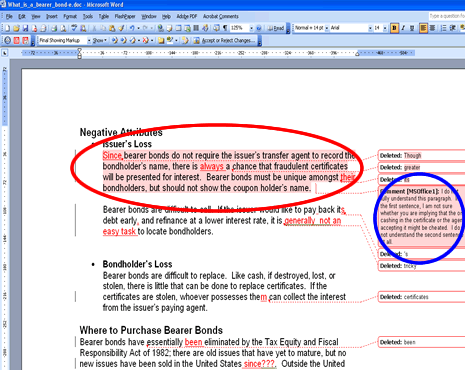
To remove editor comments, open your document using Microsoft Word. Notice that an editor comment has highlighted the first paragraph, which is circled in red in this example. The corresponding editor comment is circled in blue.

Microsoft 365 Personal | 12-Month Subscription, 1 person | Word, Excel, PowerPoint | 1TB OneDrive cloud storage | PC/Mac Instant Download | Activation Required Subscription (PC/Mac) Microsoft 365 Personal Subscription – 12months
- With a Microsoft 365 12‑month subscription, you can create, organize, and get things done.
- Bring out your best with premium Office apps, including Word, Excel, and PowerPoint.
- Easily access, edit, and share files and photos across all devices with 1 TB of OneDrive cloud storage.
- Keep it all together with Outlook, an ad‑free app for your email, calendars, to‑do lists and contacts plus security tools that keep your information protected.
- Protect your files with advanced security features like built‑in ransomware detection and recovery, and you can use two‑step identity verification to access your most important files in OneDrive Personal Vault.
$69.99

Buy on Amazon
Step 2:
Right click on the Editor Comment. A new drop-down menu will appear; select Delete Comment.
*It is important that you address the editor comment. Microsoft Word does not automatically make the change suggested by the editor. Editor comments are used to clarify your document, to teach you how to correct a recurring problem, or to ask you to elaborate on a topic.

Step 3:
Notice that the first paragraph is no longer highlighted in red, and that the corresponding editor comment has been deleted.

As part of our dedication to providing you with comprehensive editing resources, we include affiliate links to selected word processing tools. If you decide to make a purchase through these links, we earn a small commission at no additional cost to you. This arrangement helps support our efforts in delivering valuable content and insights to enhance your career, in compliance with FTC guidelines. Please be assured that our recommendations are based on thorough research and the genuine value these tools offer to our audience.